
Make MP3s playable from your blog or web page
Tuesday, November 22, 2005Those lovely people from Del.icio.us have made available a single line of script for their Play Tagger, which you can add to your template between your head tags, and which makes all MP3 links easily playable direct from your page without more. They had previously enabled this just on Delicious's site, but now we can all use it on our blogs or sites.
Links to MP3 files on your blog page will now look like this:

and obviously once you've clicked the right arrow to play, you can stop it by clicking the red stop square:

The code to add to your template between the <head> and </head>tags is just this:
<script type="text/javascript" src="http://del.icio.us/js/playtagger"></script>
[Added 26 November:] If you're a relative beginner and haven't a clue what that meant, I've now done a basic step by step howto which hopefully will help - if you have any other questions after that, just let me know!
What's more, as you can see, once you've started playing an MP3 the script automatically adds a "tag this" link so people can easily post and tag the MP3 to Delicious if they like what they hear. Clicking this link takes your vistor to their delicious login page, and once they login it's pre-filled in with the URL of the MP3 and - very clever this - the Description is also filled in with info from the MP3 metadata like singer, album and trackname!
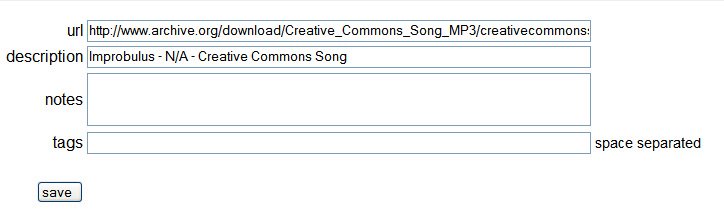
Try it out on my Copyfighters London August 2005 speeches page (which I've now edited to remove the embedded player - much faster loading, and I don't need it now I've got Playtagger). The alignment of the play arrow seems a bit odd as you can see from my screenshots and page, but who cares, this is great!
Via Delicious blog. (But what's wrong with ClickNipples for a name, I ask?! TagNipples even??)
Technorati Tags: Delicious, del.icio.us, social bookmarks, Playtagger, Play tagger, tagging, music, audio, MP3, MP3s, play MP3s, blog, blogs, blogging, blogging tools, blog tools, Improbulus, A Consuming Experience, Consuming Experience
Add this post to Del.icio.us, Digg or Furl | Email this post to a friend | 
 Edit | New
« Home | Previous Post »
 Feeds
Feeds


Links to this post on:
Create link here by posting on Blogger
14 Comment(s):
Cool. That's a nice piece of code.
(By Milan, at Tuesday, November 22, 2005 6:09:00 PM)
Edit Comment
Milan, at Tuesday, November 22, 2005 6:09:00 PM)
Edit Comment
Hey thanks for the heads up on how to put on mp3s.
you rock
(By click here to see tornado pics, at Tuesday, November 22, 2005 7:55:00 PM)
Edit Comment
click here to see tornado pics, at Tuesday, November 22, 2005 7:55:00 PM)
Edit Comment
Thanks for the comments!
Tara, you just put in a <a href="URL of MP3 file">Link text</a> link in your post, linking to the MP3 file, and as long as you have the Delicious Playtagger Javascript code in your template, people can play the file from your post.
If you don't want to link to an existing MP3 file, but want to post your own MP3 file, then you need to find somewhere to host the MP3, upload it and then link to it from your blog post.
I'll do a post soon on the hosting provider I've been using for my MP3 files.
(By Improbulus, at Wednesday, November 23, 2005 12:04:00 AM)
Edit Comment
Improbulus, at Wednesday, November 23, 2005 12:04:00 AM)
Edit Comment
This post was a huge help. Thanks so much.
(By micah, at Wednesday, November 23, 2005 6:23:00 AM)
Edit Comment
micah, at Wednesday, November 23, 2005 6:23:00 AM)
Edit Comment
Now, THAT is the way to go with audio, no more audioblog players or having to use a flash player button.
Deli.cio.us has been really busy lately improving themselves. the only thing leftfor them to do is the custom tagclud thingandthe load on page thing that simpy has....
very impressed.
i just have one very naive question, the thing gets taken as podcast file if you are using a podcast ready feedburner feed? ;)
anyway now i will wait for your host provider....i will be crossing my fingers so it be the 100 mb at a time and 10gs thing for free i have been waiting for to appear =)
(By Anonymous, at Wednesday, November 23, 2005 9:32:00 AM)
Edit Comment
Anonymous, at Wednesday, November 23, 2005 9:32:00 AM)
Edit Comment
I've already placed in one in mine. It's "Bittersweet Symphony" by The Verve. Check it out:
willows-ramblings.blogspot.com
*Please leave a comment... n_n
(By Nathalie, at Wednesday, November 23, 2005 10:40:00 AM)
Edit Comment
Nathalie, at Wednesday, November 23, 2005 10:40:00 AM)
Edit Comment
I've been looking 4 something like this. The internet can b such a quite place!
Thanx
:)
(By starbender, at Wednesday, November 23, 2005 1:35:00 PM)
Edit Comment
starbender, at Wednesday, November 23, 2005 1:35:00 PM)
Edit Comment
Hi, nice job with your blog. Love it!!! I have been asking around on how to play mp3 in my blog, and you have come to my rescue.
I have fews questions:
1. Where do I insert the script?
2. What should I do after that?
Thanks a millions for the post and also for your time.
(By athen, at Wednesday, November 23, 2005 4:30:00 PM)
Edit Comment
athen, at Wednesday, November 23, 2005 4:30:00 PM)
Edit Comment
Cute code. :) I hope I'll get up to putting some mp3s on my blog soon.
Thanks for the tips,
G.C.
(By GammonChick, at Thursday, November 24, 2005 10:13:00 AM)
Edit Comment
GammonChick, at Thursday, November 24, 2005 10:13:00 AM)
Edit Comment
Neat idea. Thanks!
(By CL, at Friday, November 25, 2005 6:18:00 PM)
Edit Comment
CL, at Friday, November 25, 2005 6:18:00 PM)
Edit Comment
Great blog! Check out mine at http://abclost.blogspot.com
(By Nick, at Saturday, November 26, 2005 1:00:00 AM)
Edit Comment
Nick, at Saturday, November 26, 2005 1:00:00 AM)
Edit Comment
Nice blog. keep up the good work. i sure will regularly be coming back. You can check out my blog
Solomon's voip world devoted to voip technology and internet telephony.
(By Solomon, at Saturday, November 26, 2005 5:30:00 AM)
Edit Comment
Solomon, at Saturday, November 26, 2005 5:30:00 AM)
Edit Comment
Thanks for your comments!
Athen I've done a step by step howto now, see this post.
Anon I answered your podcast question towards the end of post linked to above. Basically it still works - I tested it. And I've done a post on free unlimited hosting of legal MP3s as well. Hope it helps you (and JHG, who I think meant to comment here but commented on another post).
(By Improbulus, at Sunday, November 27, 2005 1:49:00 AM)
Edit Comment
Improbulus, at Sunday, November 27, 2005 1:49:00 AM)
Edit Comment
It in indeed helped me improbolus, thank you very much for the quick update, and yeah i agree with you, video is next on this, hell even for speacil photo tagging..and displaying within a blog so it loads on the same page... for that i was thinking that it is gonna need some kind of floater, like the floater add.. given the thing is javascript and the ways it operates i think that must be the way to go... a tiny screen for load, custom to lets say 150 x 150 and when you click the video it display a floater at the same height in the page for a 500 x 500 screen.. it could work....the only thing is to figure it out... i have figured out a complete page floater loader....i could only hope my code learning gets better...
and about ourmedia.org. as you said it is kinda catchy and it is not what i am looking for..i have made a temporal solution for my needs using a geocites account for scripts, a blogupload for musica and flash and youtube for movies..is the best combination so far...and belive me i have looked.
It is greatto learn almost every day from you, john, and some other names in the blog scene. so thanks for everything and i hope i didn´t bore you out to tears with this post. i will show you my blogsites when they are finished for advice.
-Alex D
(By Anonymous, at Sunday, November 27, 2005 8:19:00 AM)
Edit Comment
Anonymous, at Sunday, November 27, 2005 8:19:00 AM)
Edit Comment
Post a Comment | Subscribe to all comments on all posts